Getting Started in Volley Bomb
First-match checklist for squares, Shift Lock, bumps, spikes, and dives.
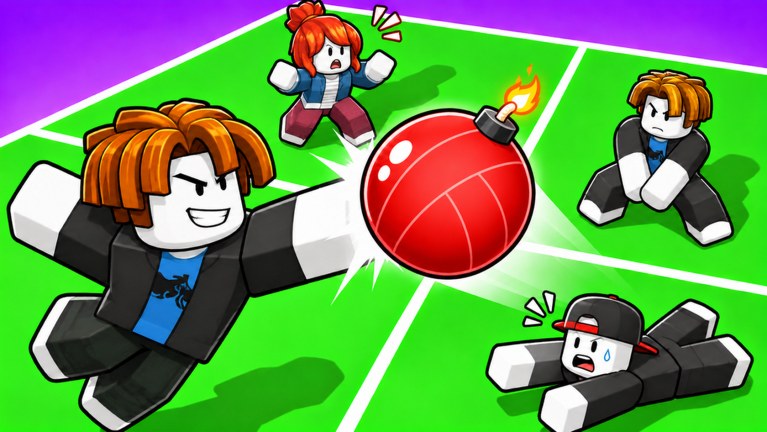
Volley Bomb is a free Roblox action game from the is peaaaaak group that turns foursquare into bomb volleyball. You claim a square, bump or spike a bomb-ball toward other players, and dive when it drops in your zone — because the ball explodes when it touches the ground. This getting-started guide walks you through the first match, the explosion rule, Shift Lock, and exactly which wiki pages to open next.
Join and claim a square
Open Volley Bomb on Roblox and join a public server. Servers support up to 14 players, so expect crowded courts and overlapping pressure. After you load in, move into an open square and treat that space as yours. Your job for the rest of the rally is simple to say and hard to execute: keep the bomb from resting on your floor.
If the ball is already in play when you arrive, watch one full exchange before you commit. Learn who is aggressive with spikes and who only bumps. Early awareness beats sprinting into a bad angle.
Enable Shift Lock before you fight
The official controls banner ends with a hard rule: USE SHIFT LOCK. Shift Lock locks your facing to the camera so bump and spike directions stay predictable. Without it, mouse aim and character facing fight each other and your hits drift into empty space or back into your own square.
Turn Shift Lock on as soon as you spawn. If you play on mobile or controller, still align your camera so you are looking toward the square you want to attack. Full device bindings live on the controls guide; skim that page once after your first session so muscle memory matches your platform.
Core loop: bump, spike, dive
Volley Bomb has four combat actions:
- Bump — Left Mouse Button on PC, tap UI / screen on mobile, R2 on controller. Use bumps to keep the bomb alive and redirect it when you do not have a clean spike angle.
- Spike — Jump plus the same hit input. Spikes send harder pressure into enemy squares. Timing and aim are covered in depth in How to Spike.
- Dive — E on PC, UI button on mobile, R1 on controller. Dive when the ball is about to land in your square so you touch it before the ground does. See How to Dive.
- Ability — R on PC, UI button on mobile, L2 on controller. Abilities such as Magnet and Super Spike change rallies when timed well. Start learning them in the abilities guide.
Your first successful matches will feel like this: bump to stabilize, spike when the camera faces an enemy square, dive the moment the trajectory enters your floor, then reset stance for the next contact.
The explosion rule (never ignore it)
The bomb explodes when it touches the ground. If it falls in your square and you do not dive in time, you take the hit and lose that square pressure for the exchange. That single rule is why dive practice matters as much as flashy spikes. Many new players spam bumps while staring at the sky and only remember dive after the explosion animation starts — that is already too late.
Train a simple habit: as soon as the ball arcs toward your square, decide whether you can bump standing or must dive. If the landing point is near the edge of your zone and you are late, dive. Standing pride loses squares.
First-match checklist
- Join the experience and enable Shift Lock.
- Claim a clear square and face outward toward rival zones.
- Bump safely until you understand ball speed in this lobby.
- Attempt one controlled spike into an occupied enemy square.
- Dive at least once on purpose when the ball drops near you so the input feels natural.
- Press ability only when you understand what your loadout does — otherwise hold R and read Abilities after the match.
- After the session, open this wiki again and pick one mechanic page instead of grinding the same mistakes.
Watch the pace of a real lobby
The video on this page shows live Volley Bomb pace: how fast the bomb moves, how players stack spikes, and how dives look when they land on time. Use it as a visual reference after you read the checklist, not as a substitute for practice. Pause when you see a save you want to copy and note whether the player dove early or late relative to the bounce.
Common beginner mistakes
No Shift Lock. Aim feels random. Fix it before you blame latency.
Only bumping. Soft returns give opponents free setups. Mix in spikes once you can aim.
Diving too early. You slide out of position and cannot recover for the next touch. Read timing notes in How to Dive.
Diving too late. The ball kisses the floor and explodes. Start the dive when the arc commits to your square, not when the shadow is already under your feet.
Spamming ability. Magnet and Super Spike have real cooldowns. Wasting them on safe bumps leaves you empty when a serve steal or finish would win the exchange. Compare value on the tier list after you understand each kit.
Ignoring camera. Even with Shift Lock, if you stare at your own floor you will spike into yourself. Keep the camera oriented toward the square you want to hit.
Where to go next on this wiki
Follow this order after your first few matches:
- Controls — lock in PC, mobile, and controller mappings plus UI buttons.
- How to Spike — jump-plus-hit timing and aiming into enemy squares.
- How to Dive — save timing, recovery, and when not to dive.
- Abilities — Magnet, Super Spike, and R-key decision making.
- Tier List — see which options are strong in the current meta.
- Codes — claim free rewards when drops go live.
- Updates — patch notes that change timing or ability strength.
- Players — playstyle ideas once mechanics feel stable.
- Official Links — Discord and official Roblox page for community news.
- Return to the Guides Hub whenever you need the full map again.
Only open Scripts if you fully understand the account risk; this getting-started path assumes fair play.
Practice plan for your second hour
Spend ten minutes only bumping with Shift Lock on, focusing on sending the ball out of your square. Spend ten minutes only on spike attempts into occupied zones. Spend ten minutes forcing dive saves even when a standing bump might work, so the E / R1 reflex builds. Spend the rest of the hour mixing all three and pressing ability once per cooldown with intent. That structured hour beats two hours of random queues.
Mindset for crowded servers
With up to 14 players, someone will always be aiming at your floor. Do not tilt when you lose a square early. Reset camera, re-enable Shift Lock if it dropped, and treat the next rally as a clean slate. Volley Bomb rewards composure: the player who dives on time and spikes with purpose outlasts the player who only chases highlight kills.
When you finish this page, leave with three habits locked in: Shift Lock always on, dive before the ground touch, and spikes aimed at people — not empty air. Everything else on the Guides Hub builds on that foundation.
Frequently Asked Questions
Quick answers to the most common Volley Bomb questions.
What is the main goal in Volley Bomb?
Keep the bomb from landing and exploding in your square. Bump or spike it toward other players, and dive with E (or the mobile / controller dive input) when it drops in your zone.
Do I really need Shift Lock?
Yes. The game itself calls out Shift Lock. It keeps facing aligned with the camera so bump and spike aim stay consistent. Details are in the controls guide.
What should I learn after my first match?
Read How to Spike and How to Dive, then the abilities guide. Check Codes and the tier list when you are ready for progression and meta picks.
When does the ball explode?
When it touches the ground. If that happens in your square without a successful dive, you take the explosion. Protect the floor first, highlight spikes second.
Where is the official community?
Join through the links collected on Official Links, including the Volley Bomb Discord, and always verify news against the Roblox game page.